
Export any web table to clean Excel & Sheets in 1 click.
Turn messy HTML tables, AG Grid, and MUI DataGrid into formula-ready .XLSX, CSV, or Google Sheets. Preserves leading-zero SKUs, parses global currencies, and calculates live Sum/Avg. Zero cloud uploads.
4 ways standard copy-paste silently corrupts your spreadsheets.
Manual Ctrl+C looks fine until your VLOOKUP fails, your SUM returns #VALUE!, and 980 off-screen rows quietly vanish.
Leading Zeros Disappear
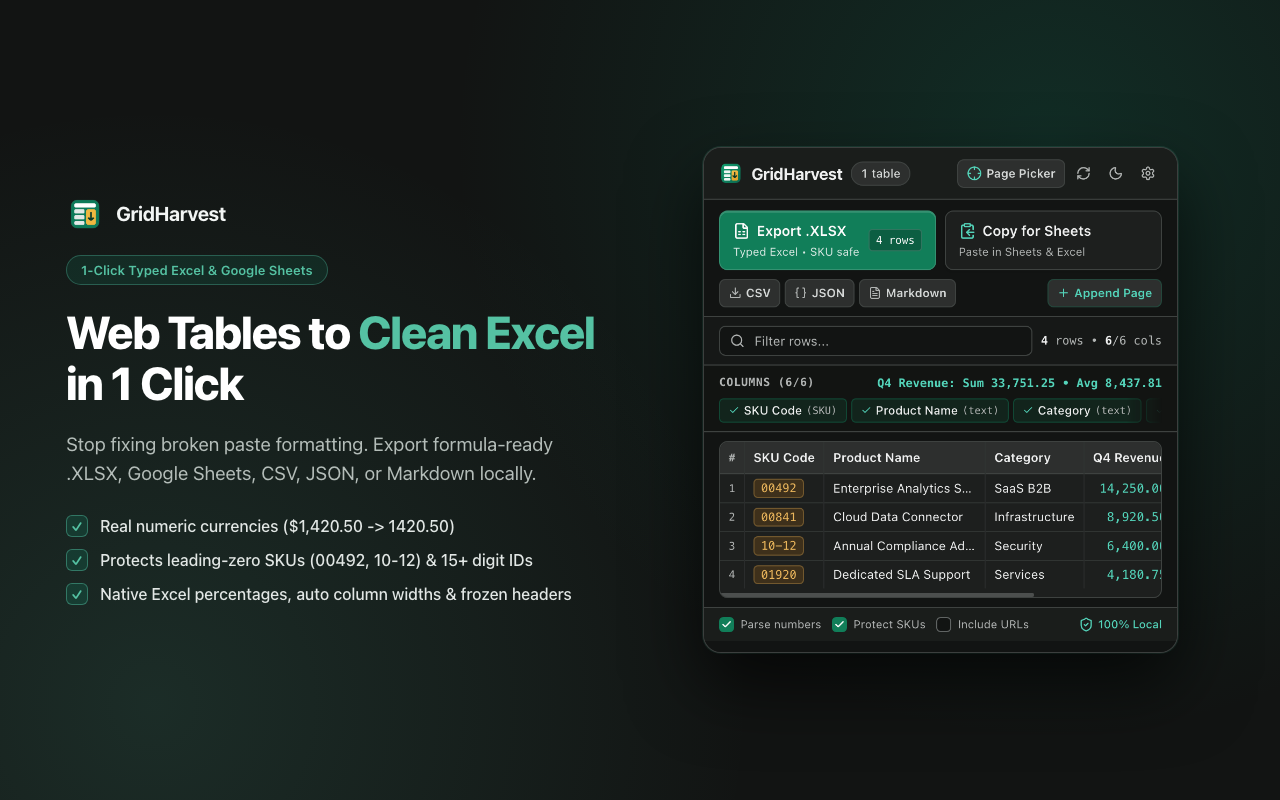
SKUs, ZIP codes, and account prefixes lose leading zeros the second you paste. GridHarvest locks them as explicit OpenXML text.
Part Codes Mutate Into Dates
Hyphenated codes like 10-12 or MAR-01 get rewritten into irreversible dates. GridHarvest shields date-like IDs automatically.
Currencies Break Formulas
Accounting negatives, EU decimals (1 420,50 EUR), and $1.2M suffixes paste as dead text. GridHarvest writes real numeric cells.
Virtual Grids Drop 95% of Rows
Modern React and ERP grids only render ~20 rows in the DOM at once. Capture All sweeps both axes automatically to grab every cell.
Every edge case handled. Right inside your browser.
No fragile scraping recipes, no cloud queues, and no paywall after row 250.
Formula-ready Excel workbooks, generated 100% locally.
Native OpenXML .xlsx with auto-fitted column widths, frozen header rows, real percentages (84.5% -> 0.845), and multi-sheet batch export. Or copy clean TSV straight into Google Sheets.
Capture 1,000+ rows from virtualized grids.
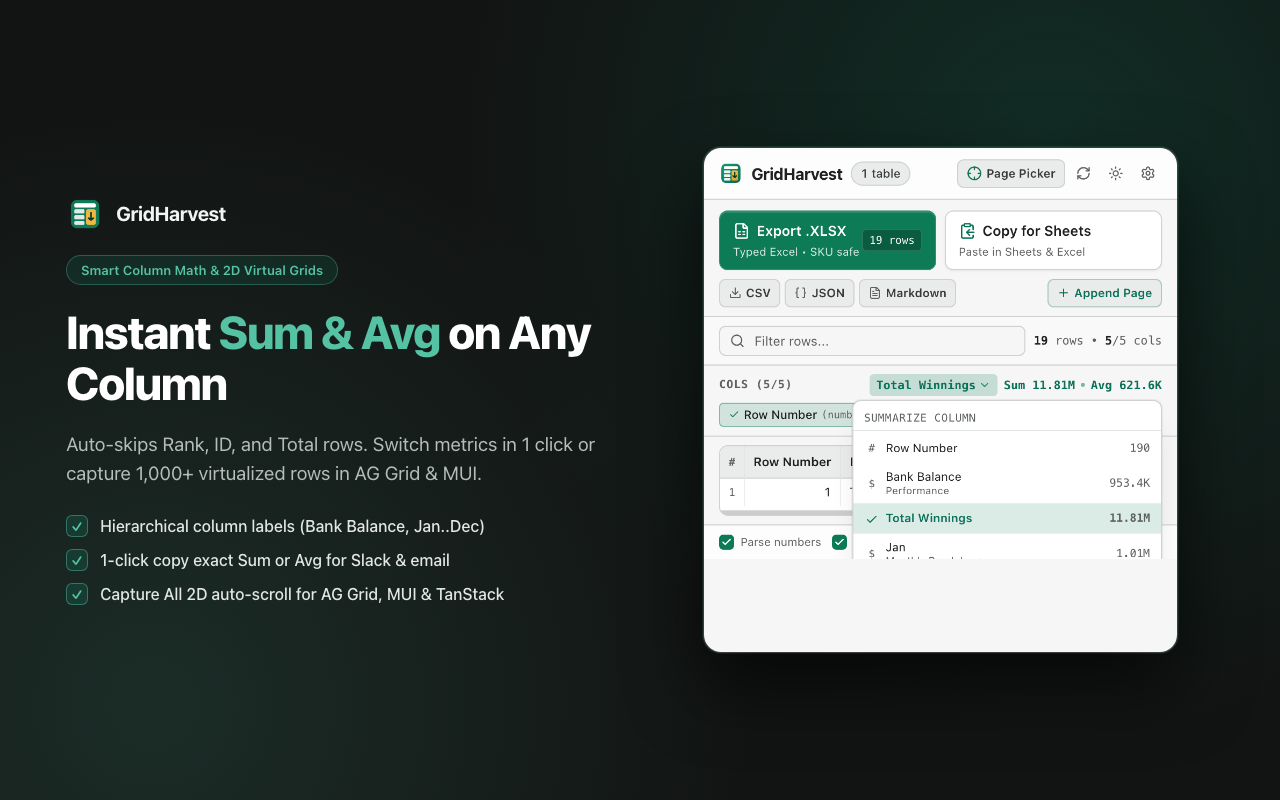
Detects virtualized React and enterprise grids, then sweeps vertical and horizontal scrollbars automatically to capture off-screen rows and columns without duplicates.
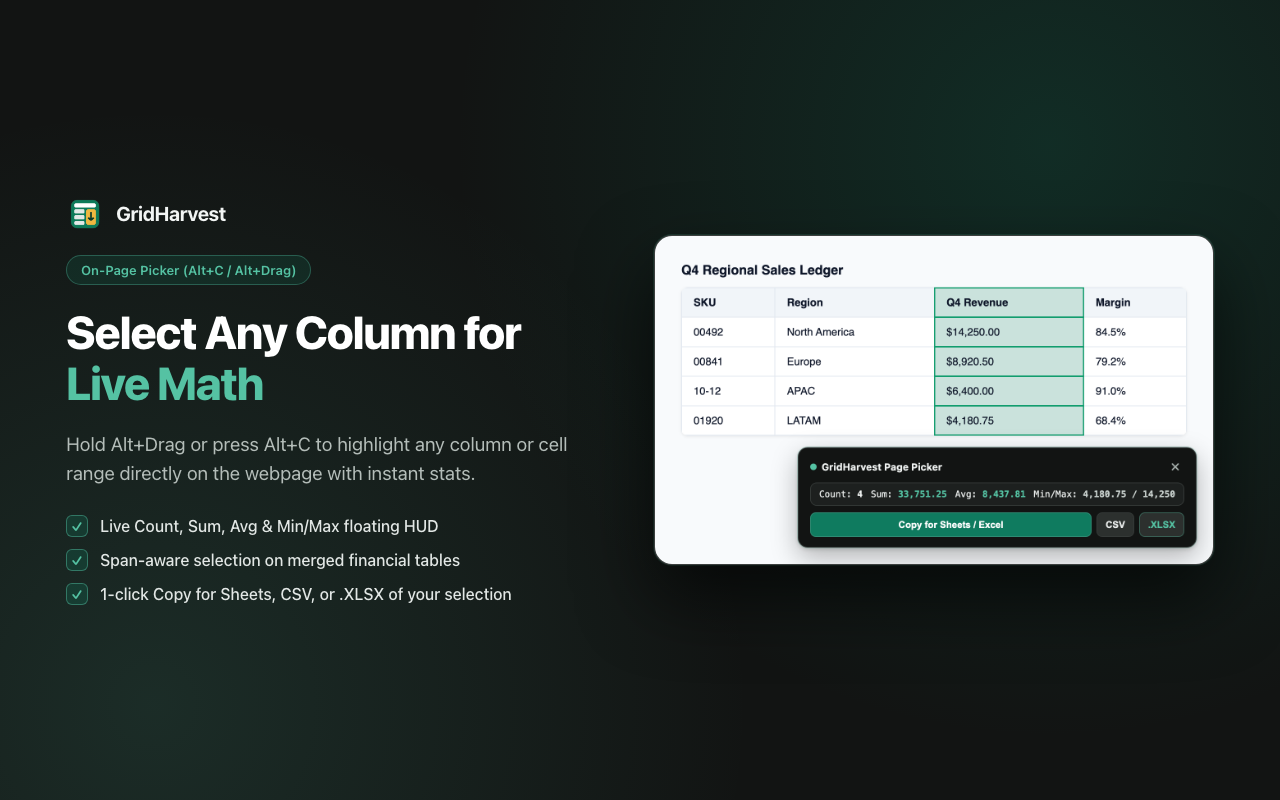
Select any column. See Sum & Avg on the page.
Hold Alt+Drag across any table cells for instant Count, Sum, Avg, and Min/Max right over the webpage, then copy or export only your selection.
Stitch paginated tables into one clean spreadsheet.
Click + Append Page as you step through pages 1, 2, 3. GridHarvest merges rows into a local basket, removes duplicates automatically, and exports a single clean workbook.

Built for complex enterprise portals with zero scary permissions.
Why analysts switch to GridHarvest.
No 250-row paywalls. No deprecated Manifest V2 code. No cloud servers reading your internal dashboards.
| Capability | GridHarvest | Table Capture | Copytables | Manual Copy-Paste |
|---|---|---|---|---|
| Pricing & Row Limits | Free, unlimited rows | 250-row free cap; Pro subscription | Free (limited updates) | Free |
| Chrome Manifest V3 | Native MV3 | MV3 | MV2 deprecated | N/A |
| Native Typed .XLSX | Yes (local OpenXML) | Paid Pro tier | No (CSV/TSV only) | No |
| Leading-Zero SKU Protection | Built-in (00492, 10-12) | Partial / manual | No | Strips zeros & mutates dates |
| Global Currency & % Parsing | Yes ($1.2M, ($450), EUR) | Basic | No | Pastes as #VALUE! text |
| 2D Virtual Grid Capture (AG Grid) | Yes (2D Capture All) | Paid / vertical only | No | Drops ~95% of rows |
| On-Page Alt+Drag Live Sum/Avg | Yes (Count, Sum, Avg, Min/Max) | No | Selection only | No |
| Multi-Page Basket (+ Dedupe) | Yes (Free, local) | Paid Pro tier | No | Manual stitching |
| Host Permissions (<all_urls>) | Zero (activeTab only) | Broad site access | Broad site access | N/A |
| Cloud Uploads / Login | Zero servers, no account | Account / cloud for Pro | No | No |
Built for people who live in browser tables and Excel.
Pull clean numbers from billing and ERP portals without #VALUE! errors.
- Converts accounting negatives ($450.00), European formatting (1 420,50 EUR), Swiss CHF 1'420.50, and $1.2M into real numeric cells ready for SUM() and pivots.
- Preserves 15+ digit invoice, IBAN, and transaction IDs so Excel never turns them into 4.11E+15.
- Runs 100% locally with zero host permissions so sensitive P&L and payroll data never leaves your browser.
Hold Alt+Drag on any revenue column to verify Count, Sum, and Avg right over your billing portal, then click once to copy the exact total for chat or email.
Export supplier catalogs and marketplace grids without destroying SKUs.
- Locks leading-zero SKUs (00492, 07) and hyphenated part numbers (10-12, MAR-01) as explicit text in .xlsx and CSV.
- Combines multi-page catalog tables via + Append Page with automatic duplicate row removal.
- Extracts underlying product URLs into dedicated columns when needed and skips price ranges ($100 - $200) cleanly.
Toggle Include URLs in the footer and click All (N) to export every table on a supplier sheet into separate Excel tabs with clickable links.
Harvest full virtualized grids and messy wiki tables in seconds.
- Sweeps 1,000+ rows and off-screen columns from AG Grid, MUI DataGrid, and modern React admin dashboards.
- Cleans wiki footnotes, hidden sort keys, rowspan/colspan headers, split sticky headers, iframes, and Open Shadow DOM tables.
- Exports directly to JSON, Markdown, CSV, or typed .xlsx for Python/pandas, Notion, or Google Sheets.
Press Alt+C on any page to launch Page Picker, click any column header to select the whole column, and copy clean TSV or JSON in 1 click.
Quick answers before you install.
How do I export an HTML table to Excel or Google Sheets?
Click the GridHarvest icon on any webpage (or press Alt+C), preview all detected tables, and click Export .XLSX, CSV, or Copy for Sheets. You can paste straight into Google Sheets or open the .xlsx file with formulas ready.
Is GridHarvest really free, or is there a 250-row paywall?
GridHarvest is free with zero artificial row limits, zero login walls, and zero credit card prompts. Native .xlsx, 2D virtual grid capture, Multi-Page Basket, and Alt+Drag math are all included.
Can GridHarvest see my browsing history or read private ERP pages?
No. GridHarvest requests zero <all_urls> host permissions and runs zero background content scripts. It only inspects the single active tab at the exact moment you click the icon or press Alt+C (activeTab), and all .xlsx generation runs 100% locally.
How does GridHarvest handle AG Grid, MUI DataGrid, and virtualized tables?
Standard copy-paste only grabs the ~20 rows currently rendered in the DOM. GridHarvest detects virtualized scroll containers and uses Capture All to sweep vertically and horizontally, capturing 1,000+ rows and off-screen columns cleanly.
How does SKU and leading-zero protection work?
When generating .xlsx or CSV output, GridHarvest automatically flags leading-zero codes (00492), date-like part numbers (10-12, MAR-01), and 15+ digit IDs as explicit text strings so Excel never strips zeros or converts them to dates.
Can I export just one column or a specific cell range?
Yes. Press Alt+C (or right-click -> GridHarvest: Open Page Picker), or hold Alt+Drag over any cells on the page. You will see live Count, Sum, Avg, and Min/Max immediately and can copy or export only your selection.
Does it work on paginated tables across multiple pages?
Yes. Click + Append Page in the popup as you navigate through table pages. GridHarvest stores rows locally in the Multi-Page Basket, deduplicates repeated headers or overlapping rows, and exports one combined workbook.
Which browsers are supported?
GridHarvest runs on Google Chrome and all modern Chromium-based browsers, including Brave, Microsoft Edge, Arc, Opera, and Vivaldi.
Stop fixing broken spreadsheets by hand.
Install GridHarvest in 3 seconds. Export your next web table to clean Excel or Google Sheets with zero host permissions.
Add to Chrome - Free